
Changing tempo in OctaMED using player commands
The easiest way to adjust playback speed in OctaMED is by using the Tempo window.
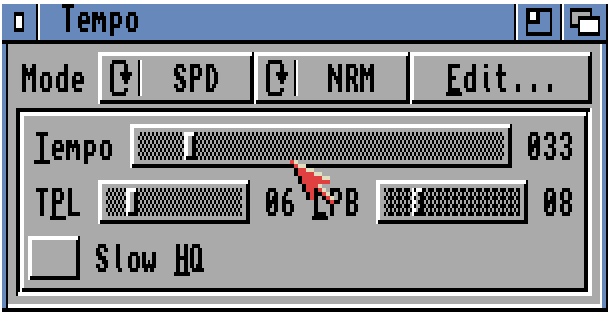
However, it’s also possible to control speed using two separate player commands.
0fxx and 09xx commands
OctaMED’s timing is based on two combined settings:
- Tempo (0F): Controls the duration of each tick — the higher the value, the shorter each tick becomes, and the faster the playback.
- Ticks Per Line (TPL 09): Determines how many ticks are used per pattern row — more ticks per line = slower playback per line.
Both commands require hexadecimal values.
Each pattern row starts on tick 1, where a note is triggered. The remaining ticks (e.g., ticks 2–6 when TPL = 6) allow commands like arpeggios, pitch bends, or slides to take effect before the next row begins.
Approximate BPM lookup table
Using the default 6 ticks per line setting (0906)
| Command | Decimal | Approx. BPM |
|---|---|---|
| 0F10 | 16 | 60 |
| 0F12 | 18 | 67 |
| 0F14 | 20 | 75 |
| 0F18 | 24 | 90 |
| 0F1A | 26 | 98 |
| 0F1C | 28 | 108 |
| 0F1E | 30 | 115 |
| 0F20 | 32 | 120 |
| 0F21 | 33 | 124 |
| 0F22 | 34 | 128 |
| 0F23 | 35 | 132 |
| 0F24 | 36 | 136 |
| 0F25 | 37 | 139 |
| 0F26 | 38 | 142 |
| 0F27 | 39 | 146 |
| 0F28 | 40 | 150 |
| 0F29 | 41 | 154 |
| 0F2A | 42 | 158 |
| 0F2C | 44 | 166 |
| 0F30 | 48 | 170 |
| 0F34 | 52 | 196 |
| 0F38 | 56 | 214 |
| 0F3C | 60 | 228 |
| 0F3F | 63 | 240 |
Example
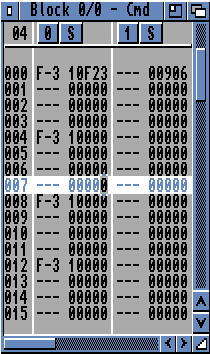
This 1-bar with F-3 on each quarter plays at around 132 BPM:
Why BPMs Are Approximations
The BPM values in the lookup table below are approximations based on:
- TPL = 6 (default value)
- Measured playback speed (by ear and metronome)
- Some values were interpolated, though I’m not sure how linear the ramp-up really is