
MIDI FEATURES
OctaMED can output notes and some player commands to external MIDI devices (such as MIDI synthesizers) by way of a MIDI interface which you should connect to your Amiga's serial port.
Note: Please refer to your MIDI device's manual if you come across terms in this section that you aren't sure of. To glean more information, press Help then select MIDI from the Features Guide.
A MIDI instrument in OctaMED is not strictly an instrument, but simply a few settings which result in the notes played with that instrument being sent through a MIDI interface. Therefore, MIDI instruments are not loaded into memory like other sounds.
MIDI instruments can also use the full 10½-octave range. Use the Oct cycle gadget (Main Control window) or the F1 - F5 keys to select these. F1 and F5 cycle through three different octaves if you press them repeatedly.
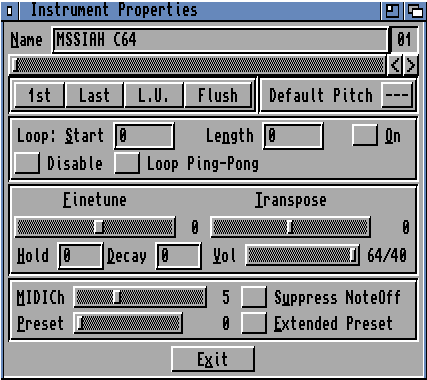
Before using a MIDI instrument, you need to change some settings in the Instrument Parameters window to the required values. MIDICh sets the MIDI channel for the instrument (1 - 16). For example, setting it to 5 means this instrument's notes are sent through MIDI channel 5. Preset sets the instrument's preset number. When set to zero, OctaMED uses your keyboard's default preset for the instrument's MIDI channel.
In order to hear a MIDI instrument, you must also set its default volume to above zero. MIDI instruments can also use all 64 possible tracks (use the Block Properties window). In addition, you may mix Amiga samples and MIDI instruments on the first four tracks.
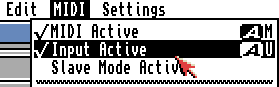
The MIDI menu contains more MIDI-specific functions and settings. MIDI Active activates MIDI when selected. Input Active, when selected, allows the entering of notes into the song using your MIDI device. Edit mode (Main Control window) and MIDI Active must be on.
Read Key-Up's, when switched on, records key-up events into the Tracker editor (as 0FFF player commands). Read Volume: If you have a touch-sensitive keyboard, the volume will be entered as a ‘set volume' player command (0C) when notes are input.
Reset Pitch/Presets resets pitchbenders, modulation wheels and presets on all channels. (OctaMED sends preset change messages for all MIDI channels).
Next up: Other miscellaneous features.